Thursday, January 28, 2010

I Am In the Will Whether You Like It Or Not.

The new set from Adore & Abhor for Fifty Linden Friday is making me squee times ten. I love 1. black 2. jackets 3. anything relating to funerals (except for the part about the dead person) and 4. vintage-style mesh hats, so the new jacket and head piece, called I'm In The Will, makes me hap-hap-happy!I think it looks straight up awesome with the Dinner at 8 dress from Sn@tch. Unfortunately this dress is no longer available in black, but you can get it in plenty of other colors.
Worn:
Dress and Socks: Sn@tch
Shoes: Nardcotix (hunt gift, free)
Jacket and Head Piece: Adore & Abhor
Hair: BP
Skin: Mango, Mango! (will be released on February 1st)

Wednesday, January 27, 2010

Freeze Frame!

Glitterati will be offering a set of poses called "Headshot 2" as Thursday, January 28th's SL Daily Deal. I played around with them and I have to admit they are a ton of fun.
I suspect no one thinks I'm as cute as I do, and these poses may have fed my ego just a little ;-)
My jewelry set is one of Wednesday's 69L Hump Day Happiness specials at DM Designs. I love the Stone Dreams sets and I wear them with casual outfits all the time. There are 2 choices available for just 69Ls each. They won't be pulled until Thursday morning, so you still have time to get them!
My friend Jerry got into the poses too. He made a remark about keeping his pimp hand strong. He'll pay for it later.
He's also wearing one of today's 69L Hump Day Happiness items from DM Designs. The men's Figaro necklaces are up in gold, silver, and black titanium for just 69Ls each. Get them before they go back to regular price on Thursday morning!
Most of the poses come with various hand configurations (pointing, relaxed, straight, fist, etc.) so you have a ton of options in each pose pack. 1,000 sets will be sold at the special SL Daily Deals price. Go get yourself a set and have some fun :)

On Isabeau:
Hair: Tiny Bird - Stein (Milk)
Skin: L.Fauna - Lapine (Pale 2, Fresh with freckles)
Eyes: MADesigns - Promise Eyes (brown pale 11)
Lashes: Miriel - Natural
Jewelry: DM Designs - Stone Dreams II (Dark Oak)
Top: Worldwide Industries - Tiny Top (old hunt gift)
Undershirt: Elymode - Lounging Cami (sage)
Poses: Glitterati - Headshot 2 (pose 8), Headshot 2 (pose 4), Headshot 2 (pose 9 relaxed)

On Jerry:
Hair: Find Ash - Le.Look L'homme Limited Edition (tinted)
Skin: Belleza - Thomas (group gift)
Eyes: Shine - Silent Lucidity (ice)
Necklace: DM Designs - Mens Figaro Necklace (Black Titanium)
Tank: Zaara
Poses: Glitterati - Headshot 2 (pose 7 relaxed), Headshot 2 (pose 9 relaxed)

Wednesday, January 20, 2010

Rock the Cradle of Love

I've wanted a denim miniskirt in SL for a while, so when Sn@tch released a whole pack of them, I made them mine. An image popped in my head of an 80's ensemble, and I just had to make it happen.

The pieces came together slowly but surely, and I'm quite happy with the result.
The "Boots of Fate" are another new release from Sn@tch this week, and they fit perfectly into the look I was trying to achieve. They're kickass pointy snake skin boots. Awesome.
I needed big hair, so Sileny directed me to Nouveau Miranda, where I found a big big hairstyle worthy of my Aqua Net fume-inspired dreams. I added a Cana skin with bold makeup and accessorized accordingly (leather, rhinestones, and crosses, oh my.)

And the pièce de résistance? The Isabeau bodice from Haven Designs, which was released this week. The detailing on the front and back is simply awesome, and it comes in 6 colors including a silver! No, I'm not partial at all...

Billy Idol, I'm ready to run away with you. Call me.

Style Notes:
Hair: Nouveau Miranda - Amazonia (Silver)
Skin: LionSkins - Cana (Pale 1)
Eyes: Negaposi - Glass eyes (Ghost)
Eyelashes: Staged - Extend Lashes
Top: Haven Designs - Isabeau Bodice (Red)
Skirt: Sn@tch - Jean Genie Denim Mini (black)
Boots: Sn@tch - Boots of Fate:::
Necklace: Ripe - Voodoo Cross Necklace (small)
Bracelets: Sn@tch - Royal Bangles
Poses: Long Awkward Pose
(the boots pic is very bright, to show the awesome detail.)

Thursday, January 14, 2010

Prim Eyelash Fitting Tutorial Redux

My first ever blog entry on BBPD - an eyelash fitting trick - has been getting some new attention lately. For some people, the "trick" I discovered and shared there is enough to help them finally fit their lashes, but others need more help. I found a pair of lashes in my inventory that I hadn't fitted yet, so I'll walk you through my process and hopefully it will help you wear those pesky (but necessary) prim eyelashes with confidence.*

If you haven't already, go into appearance mode. Click "shape" to edit your shape, then "eyes" and scroll to the bottom. Make sure your eyelash length is set to 0. We don't want those unsightly system eyelashes getting in the way!
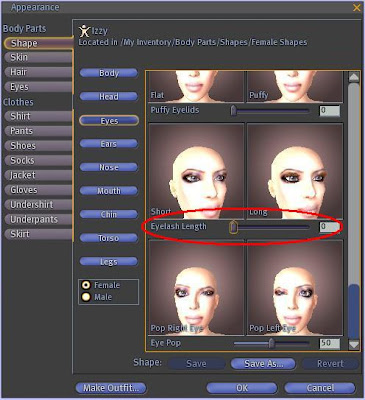
If the lashes are copyable, I suggest you make a backup of them before you proceed. I usually add "BACKUP" on the end so I know which one is the original.

Once I pull them forward a bit, I make sure each prim on the right is the same size as its match on the left. In the beginning I had such trouble fitting the left side until I realized... nearly all of my left side eyelashes were different sizes than the right side lashes! (I have no idea why so many designers do this.) Now I resize each side to match the other (copy and paste are your friends.)
IMPORTANT: Make sure "edit linked parts" is checked, and that you have ONE prim selected before changing anything in the size fields. You don't want ALL of the prims to be exactly the same size; you want the top left to be equal to top right, and bottom left to be equal to bottom right. If you make a mistake, hit CTRL and Z to undo your last change.

For now, I'll ask that you forgive my poor photo editing skills. I promise you I'm much better at editing lashes than I am at post-processing pictures!

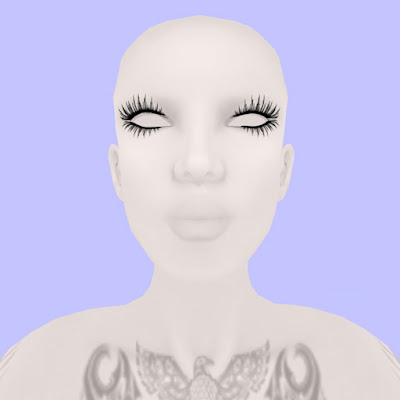
This is where the mannequin skin and eyes from Imagen come in very handy. There's no makeup to get in the way of the editing process. You could also use a bare system skin, but I think the stark contrast of white on black makes things a lot easier.

Pressing CTRL will bring up the compass so you can edit rotation. Hold down CTRL and drag the directionals with your mouse. Play around with them a bit. It will probably take a while and a considerable amount of adjusting on all 3 axes to make the lashes follow the curve of your eyes, and to ensure no part of your face pokes through.
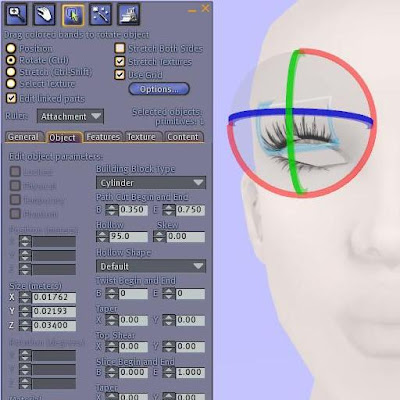
If you feel you need to zoom in closer, hold down CTRL and hit 0 (zero) until you're at a comfortable zoom. (CTRL 9 will snap your camera back to its normal position.) You can also edit camera controls under Preferences > Input & Camera.

This is what my lashes look like after a good bit of editing (a few minutes per prim.)
And with a skin:
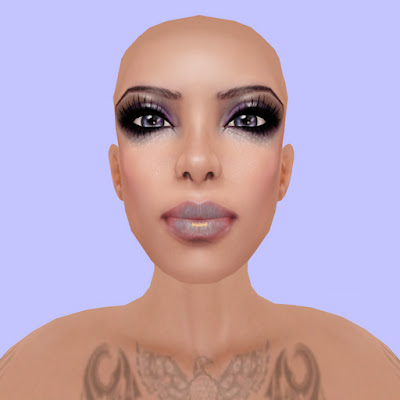
If you change your shape, you will likely need to re-fit your lashes. If you can, always use copyable eyelashes and put a set in with your shape if necessary. (I rarely change my face, so this isn't an issue for me.)

Credits:
Mannequin skin and eyes: Imagen (slurl updated August 2010 after store move)
Eyelashes: Staged Extend Lashes
Tattoo: Otaku Designs (now Lolapop) Azteca Tattoo
Skin: LionSkins CANA PALE 7
Eyes: Umedama Holic Frozen eye (gift 07)

* = Disclaimer: Due to the wide variety of shapes and textures used by designers, this basic/beginner level tutorial may not work with all lashes. There are lashes in my inventory that required intensive editing of not only the size, path cut, and hole size of the prims, but the texture repeats, rotation, and offsets as well. I believe all lashes can potentially be fitted to your shape, but you may need to have a certain level of comfort with building in order to do so.

Monday, January 11, 2010

Tazzmania New Release

My pal Tazzy owns Tazzmania and frequently releases cute, creepy, and crute (mix of cute and creepy rofl) items but never really anything "sexy". Well now things have changed. Oh Tazzy, you make me hot stuff.There are dresses with pink bows, dresses with black bows, all full of lace and tiny skulls......and then there is the chain one! Big WOO! for this considering my love of chains. Mmm...constricted.P.S.- The skin is a freebie from Nuuna's which I have blogged before but never get tired of.
Worn:
Dress: Tazzmania
Skin: Nuuna's (free!)
Hair: Lamb
Necklace: Rebel-X
Tattoos: Sn@tch
Shape: Not for sale, but you can find other shapes by me at Shape It Up! and there is a sale going on now :D

Friday, January 8, 2010

A Sn@tch A Day Day 4: The Forgiveness

Oh Isabeau, I promised you'd I'd be back and I fell asleep. Now I must grovel. Grovel I must.I meditated on my inner groveling peace for so long that I attracted woodland creatures. They only bit me a little bit.
On the Repenting One:
Nip Slip Dress/Gloves/Brooch, Spiked Collar, Tattoos, Skin: Sn@tch
Animals (Gacha Prizes): Kue
Hair: Tukinowaguma
Boots: SLink
Photos taken outside of the Kue lucky boards.
 

Template by BloggerCandy.com